Managing OpenClaw Skills at Scale — What We Learned Building an Enterprise Platform
Our research into enterprise skill management on OpenClaw: why we abandoned a dedicated install service, how self-governing installation via the standard API works, and four hard-won lessons about global directories, agent isolation, and prompt conventions.
We spent several months figuring out how to manage OpenClaw skills from a central business platform — install them on demand, keep versions in sync, and make sure each agent only sees the skills it is supposed to. This is not a polished product announcement. It is a field report from the exploration phase: what we tried first, why we dropped it, what we landed on, and the four traps that cost us the most time.
If you are building something similar — a SaaS console that provisions agents for different teams, or an internal ops platform that pushes skills to OpenClaw hosts — this should save you a week of dead-end debugging.
The problem we were solving
OpenClaw agents get their capabilities from skills: packaged instruction sets, scripts, and tool definitions that live on the host filesystem. In an enterprise setting, you rarely want to SSH into every machine and copy folders by hand. You want a platform to say "give Agent X the invoice-audit skill at version 1.2.0" and have it happen reliably.
Our requirements looked straightforward on paper:
- Remote lifecycle management — install, update, and uninstall skills from the platform
- Per-agent isolation — Team A's agent should not inherit Team B's skills
- Auditability — record which version landed on which agent and when
- No custom daemons if we could avoid them — fewer moving parts means fewer on-call pages
What followed was a classic case of the obvious solution being the wrong one.
Phase 1: The dedicated install service
Our first instinct was to build a small install service that would sit alongside OpenClaw on every host. The platform would push a deployment package containing this service during initial OpenClaw setup — essentially pre-planting it before the agent ever went live.
The flow looked like this:
- Platform publishes a skill package to object storage (OSS/S3)
- Platform sends an install command to the host's install service over HTTP or a message queue
- Install service downloads the archive, unpacks it into the skills directory, updates local version metadata, and reports back
On paper, this is clean separation of concerns. The platform owns orchestration; the install service owns filesystem operations. We even sketched out a skill-install-server.mjs with a companion systemd unit so it would survive reboots.
We got a prototype working. Then the weight of the approach became obvious:
- Deployment overhead — Every OpenClaw host needed the install service baked into its image or provisioned as a sidecar. Platform updates to the service meant rolling out to every node, not just pushing a config change.
- Two sources of truth — The platform tracked skill versions in its database. The install service tracked what it had actually written to disk. Reconciliation after partial failures turned into custom retry logic we did not want to maintain.
- Security surface — A long-running HTTP listener on every agent host, even internal-only, is another thing to firewall, rotate credentials for, and patch.
- Process length — Train the service, embed it in the OpenClaw image, deploy the image, then wire the platform to talk to it. For a team that already had OpenClaw's chat API available, we were building a parallel control plane for no good reason.
We shelved the install service. The leftover files (skill-install-server.mjs, skill-install-server-v3.mjs, skill-install-server.service) still sit in our workspace as a reminder.
Phase 2: Self-governing skill installation
The replacement model is simpler: let OpenClaw install its own skills.
Instead of a sidecar service, the platform sends a message through OpenClaw's standard chat completions API to the main agent. The message body contains a structured instruction with a fixed prefix. When the main agent sees that prefix, it executes the corresponding operation — download from OSS, unpack, update version records — without any external script or middleware layer.
Install request example
Send a POST to the chat completions endpoint with agent set to main:
{
  "agent": "main",
  "messages": [
    {
      "role": "user",
      "content": "【SYS:INSTALL_SKILL】\n{...payload...}"
    }
  ]
}
The content string joins a prefix and a JSON payload with \n. Expanded, it looks like this:
【SYS:INSTALL_SKILL】
{
  "skillId": "email-send",
  "versionNo": "1.0.1",
  "targetAgent": "xiaotai",
  "ossUrl": "https://your-bucket/skills/email-send_1.0.1.zip"
}
Equivalent curl:
curl -X POST "https://your-openclaw-host/v1/chat/completions" \
  -H "Content-Type: application/json" \
  -H "Authorization: Bearer <token>" \
  -d '{
    "agent": "main",
    "messages": [
      {
        "role": "user",
        "content": "【SYS:INSTALL_SKILL】\n{\"skillId\":\"email-send\",\"versionNo\":\"1.0.1\",\"targetAgent\":\"xiaotai\",\"ossUrl\":\"https://your-bucket/skills/email-send_1.0.1.zip\"}"
      }
    ]
  }'
The prefix 【SYS:INSTALL_SKILL】 acts as a dispatch signal. The JSON payload on the next line carries the business parameters. Uninstall and update follow the same pattern with 【SYS:UNINSTALL_SKILL】 and 【SYS:UPDATE_SKILL】.
This cut our architecture down to one integration point: the API the platform already used for everything else. No extra port. No extra binary. The agent handles download, install, and version logging in one pass.
It worked — but only after we internalized four non-obvious behaviors in OpenClaw's skill system.
Four lessons from the field
Lesson 1 — Global skill directory, per-agent whitelist
This was the first thing that broke our mental model.
Skill files on an OpenClaw host typically live under a shared workspace directory — something like ~/.openclaw/workspace-<name>/skills/. That folder is global to the workspace, not namespaced per agent out of the box.
Which skills an agent can actually invoke is controlled separately, through a whitelist in openclaw.json. Each agent entry has a skills array listing the skill IDs it is allowed to use:
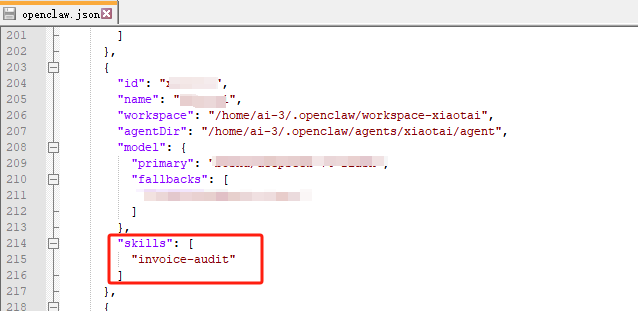
So "installed" and "available to this agent" are two different questions. You can have ten skill folders on disk but only expose two to a given agent. Our platform UI originally conflated these states, which led to confusing "skill installed but agent can't use it" support tickets.
Takeaway
Track both filesystem presence and whitelist membership in your platform's data model.
Lesson 2 — Per-agent isolation requires clearing global skills first
We wanted strict isolation: Agent A gets invoice-audit, Agent B gets email-send, and neither should see the other's skill files on disk.
Because the skills directory is shared, dropping a new skill into the folder does not automatically remove old ones. If you install Agent B's skill without cleaning up, Agent A's files may still be sitting there — even if Agent A's whitelist no longer references them.
Our workflow became:
- Clear the global
skills/directory (or remove skills not belonging to the target agent) - Download and unpack the agent-specific skill package
- Update the agent's
skillswhitelist inopenclaw.json - Reload or restart the agent context as needed
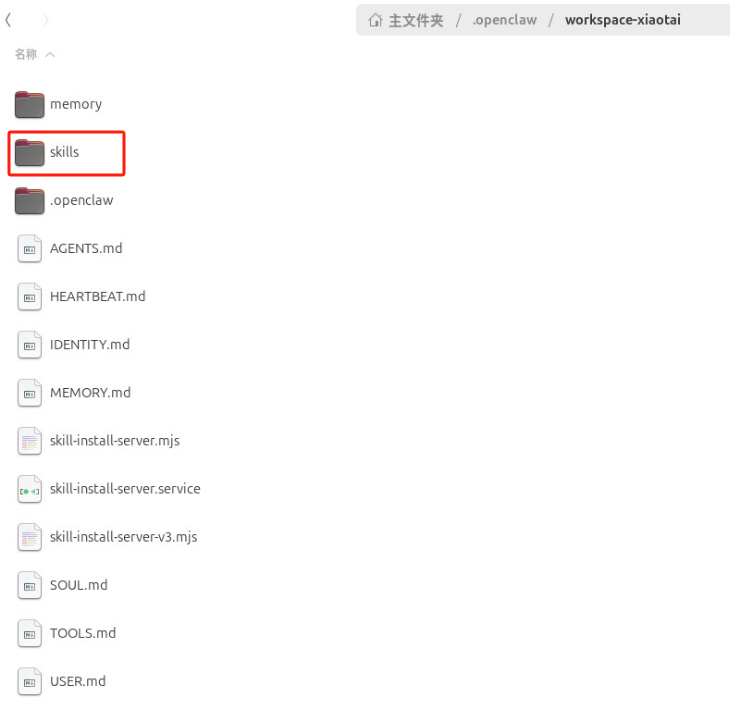
This feels heavy, but it is the reliable path until OpenClaw offers first-class per-agent skill namespaces. Skipping the cleanup step caused cross-agent leakage in our staging environment more than once.
Takeaway
Treat "install skill for agent X" as a replace operation on the global directory, not an append.
Lesson 3 — All installs route through the main agent
Even when the target is a sub-agent like xiaotai, the API call must address "agent": "main".
We learned this the hard way after sending install commands directly to sub-agents and watching them get ignored or mishandled. OpenClaw's skill installation pipeline is wired through the main agent, which then applies changes on behalf of the target.
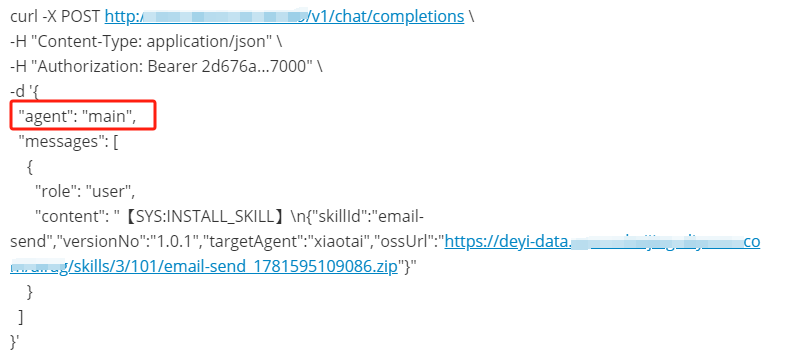
Notice the payload includes "targetAgent": "xiaotai" even though the top-level "agent" field is "main". The main agent reads the target, performs the filesystem work, and updates the correct whitelist entry.
Takeaway
Always send lifecycle commands to main. Put the intended recipient in the JSON payload, not the API route.
Lesson 4 — Standard API + prompt conventions
Raw natural language ("please install the email skill for xiaotai") is too ambiguous for production automation. We standardized on machine-readable prefixes plus JSON payloads:
| Operation | Prefix | Key fields | |-----------|--------|------------| | Install | 【SYS:INSTALL_SKILL】 | skillId, versionNo, targetAgent, ossUrl | | Uninstall | 【SYS:UNINSTALL_SKILL】 | skillId, targetAgent | | Update | 【SYS:UPDATE_SKILL】 | skillId, versionNo, targetAgent, ossUrl |

The prefixes give the main agent an unambiguous trigger. The JSON gives your platform a schema it can validate before sending. Together, they replace an entire middleware layer.
We also added idempotency keys in the platform layer so duplicate API calls — retries after timeouts, double-clicks from admins — do not trigger double installs.
Takeaway
Invest in prompt contracts early. They are your API between the business platform and the agent runtime.
Final architecture
Platform Console
    │
    │  POST /v1/chat/completions  (agent: "main")
    │  content: 【SYS:INSTALL_SKILL】 + JSON payload
    ▼
OpenClaw Main Agent
    │
    ├─ Parse prefix → dispatch handler
    ├─ Clear global skills/ (if isolating)
    ├─ Download zip from OSS
    ├─ Unpack to workspace skills/
    ├─ Update openclaw.json whitelist for targetAgent
    └─ Write version record
    ▼
Platform receives confirmation (via callback or polling)
The platform owns the catalog, versioning, and permission model. OpenClaw owns execution. No install service in the middle.
What we would do differently
- Start with the API path — If OpenClaw already exposes a chat endpoint your agents respond to, try routing admin commands through it before building infrastructure.
- Model global vs. whitelisted state explicitly — Your dashboard should show "on disk," "whitelisted," and "active version" as separate columns.
- Document the main-agent routing rule — Every engineer on the team will try to target sub-agents directly at least once.
- Plan for the global directory limitation — If per-agent namespaces land in a future OpenClaw release, our cleanup step goes away. Until then, bake it into every install workflow.
Closing thoughts
Enterprise skill management on OpenClaw is less about finding a clever deployment trick and more about respecting how the runtime actually organizes files and permissions. Our first approach — a dedicated install service pre-seeded on every host — was defensible engineering, but it fought against OpenClaw's existing agent model.
The lighter path won: standard API, structured prompts, main-agent dispatch, and honest handling of the global skills directory. It took longer to discover than to implement, which is usually how these explorations go.
If you are walking a similar path, start with one agent, one skill, and one install command. Get the whitelist and the cleanup step right before you scale to dozens of agents. The bugs do not get easier — they just happen in parallel.